
- Messages
- 11
- Likes
- 2
- City
- Albany
- State
- NY
- Country
- United States
- What I Drive
- 2014 edge
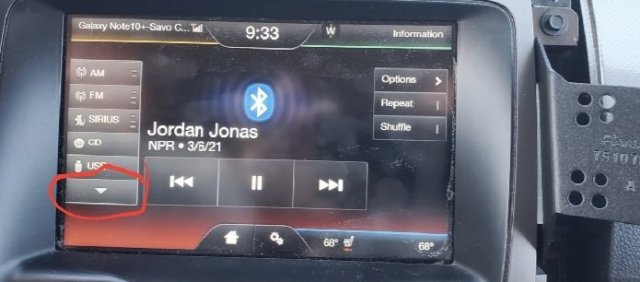
I have attempted to research this but am coming up empty. Has anyone here tried changing the Order of the Radio inputs with forscan? I would like to move the BT audio a little higher in the list, as it is on the the second "page".
I think i may have to accept that the order is static and I should removed Unused inputs. Perhaps removing Sirius radio from the list would help.
I found this to remove Sirius, but have not had a chance to change it.
APIM 7D0-01-01 *xxx xxxx xxxx
Decrement existing value where the asterisk is by 2; if you have an "A" make it "8", if you have "2" make it "0"
url: https://www.fordedgeforum.com/topic/27415-removed-siriusxm-from-main-audio-display/
https://www.fordescape.org/threads/remove-sirius-from-mft-menu.84506/
I think i may have to accept that the order is static and I should removed Unused inputs. Perhaps removing Sirius radio from the list would help.
I found this to remove Sirius, but have not had a chance to change it.
APIM 7D0-01-01 *xxx xxxx xxxx
Decrement existing value where the asterisk is by 2; if you have an "A" make it "8", if you have "2" make it "0"
url: https://www.fordedgeforum.com/topic/27415-removed-siriusxm-from-main-audio-display/
https://www.fordescape.org/threads/remove-sirius-from-mft-menu.84506/
Attachments
-
 41.7 KB Views: 2

